01Start here
Auto
Choose a mood and let the conductor rotate eligible scenes and local video while the visual engine responds to the selected audio source. A manual scene choice temporarily takes priority.
Let the show move in Auto, play scenes and FX by hand, or bring your own images, logos, videos and GLSL. The audience sees the composition; you keep the controls.
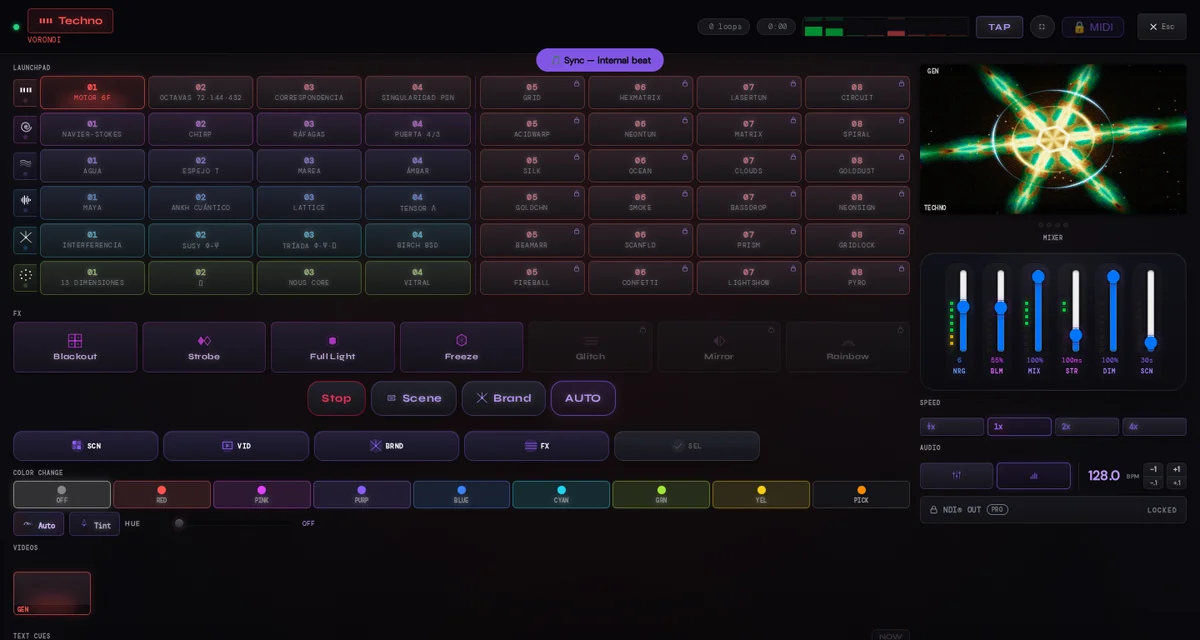
The Master keeps scene pads, audio controls, layers, FX, text and branding within reach. A visual-only surface carries the live composition without the control interface.
This is an output layout, not a hardware promise. The way a second display is connected and arranged depends on the computer, operating system, browser and display hardware in the setup.
These are three depths of the same live instrument, not separate applications. A show can move between automation and direct control.
Choose a mood and let the conductor rotate eligible scenes and local video while the visual engine responds to the selected audio source. A manual scene choice temporarily takes priority.
Launch scenes, mix the composition, set BPM, trigger performance states and FX, and add text or branding from the Master. Web Pro can map the instrument's current MIDI target set.
Use an image or video as the main visual or as a separate, adjustable layer over the show. Custom GLSL enters through Shader Lab. Free provides one media slot and one shader; Web Pro expands each bank to 21.
The on-screen Master remains the reference surface. MIDI Learn adds a physical route to a finite, explicit list of controls when WebMIDI is available and permission is granted.
Map 48 scene pads, 6 moods, 14 direct controls, 22 video launchers and 4 text cues. The direct group includes next scene, SHOW NOW, performance states, three live FX and five continuous Master parameters.
Add a JPG, PNG, GIF or video from the device. Each media item can stay Normal on the main A/B bus or become a separate Layer over the scene or video. Custom shaders enter through Shader Lab.
LumaDeck provides visual-only surfaces. The final path to a projector, television, capture setup or stream is still governed by the user's browser, system and hardware.
Open the composition in the app's visual fullscreen surface. Browser fullscreen support and user permission determine whether system chrome can be hidden.
Open a visual-only window and place it on another configured display. Popup permission and the operating system's display arrangement remain part of the setup.
Use the connection and adapter supported by the computer and display in front of you. LumaDeck does not detect, certify or supply that hardware path.
Send the master to a compatible Google Cast TV or receiver. Video output is 1920×1080, up to 30 fps, with no audio. No extra LumaDeck TV app or Output Bridge is required. Smoothness depends on the sender, receiver, content and network. Set up Cast →
Publish the visual master to OBS, vMix, Resolume or another NDI receiver. This route requires LumaDeck Output Bridge and the official NDI runtime installed on the same computer; the browser cannot create the native source by itself.
Before a show: test the exact browser profile, audio permission, MIDI permission if used, display arrangement, cable or adapter, and projector or capture input. Compatibility is a property of the complete setup, not a universal claim. NDI® is a registered trademark of Vizrt NDI AB. ndi.video
Figures below describe LumaDeck Web in the current public catalog. LumaDeck Pro is a separate product.
The guides go deeper into setup and operation, including the limits that matter before a live session.
Connect from the Master, send video only and check your setup before the show.
Read guide →The Learn workflow, current target set and local mappings.
Read guide →Load GLSL, understand the reactive inputs and test locally.
Read guide →Place it, animate its entrance and make it respond to audio.
Read guide →Audio return, internal beat, BPM and nudge in practice.
Read guide →A grounded checklist for the display path before doors open.
Read guide →Install the required bridge, publish the local source and receive it in your video workflow.
Read guide →Open the instrument for free. Move into Web Pro when the show needs the full launchpad, MIDI, larger local banks and cloud show configuration.
Open LumaDeck