Map your MIDI controller to live visuals
A mouse can launch a visual. A controller lets your hand remember where it lives. MIDI Learn turns LumaDeck's screen controls into a physical layout you can play without taking your eyes off the room.
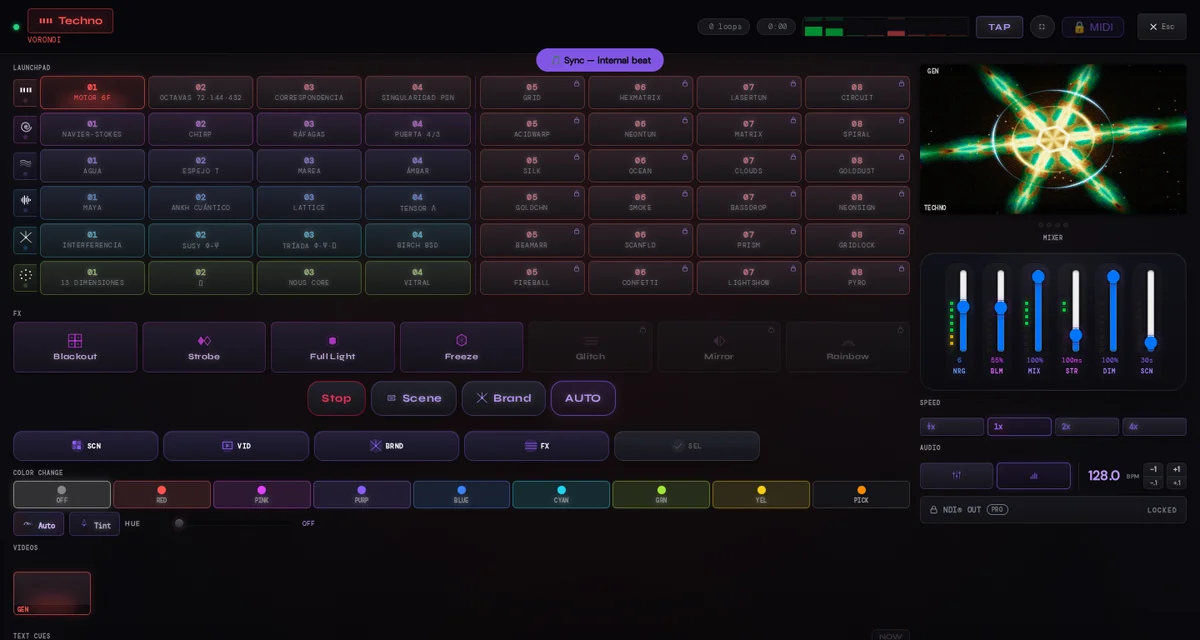
The shortest path from screen to hardware
- Connect your controller before entering MIDI Learn.
- Press MIDI and allow browser access when asked.
- Touch the highlighted control in LumaDeck.
- Press the pad, turn the knob or move the hardware control you want to bind.
- Repeat for the rest of your layout, then leave Learn mode and play it.
Each assignment is one-shot, so the control you touch and the MIDI message you send become one clear pair. There is also a delete mode for removing a mapping without rebuilding the rest.
What can you map today?
The current web instrument exposes 94 targets: 48 scene pads, 6 moods, 14 direct controls, 22 video launchers and 4 text cues. That is enough to put the grid under your fingers, keep the controls you reach for most close by, and launch your own videos and text cues from the same controller. Pair the layout with the SYNC workflow when you want music and hands driving the same performance.
Ableton Push as a real example
Push is the controller used in the founder's real setup: its pad matrix makes a natural home for the LumaDeck grid. It is an example, not a universal compatibility stamp. Any device your browser exposes through WebMIDI can be tried with the same Learn flow.
The mappings live on this machine
Your mappings and device identity remain local to the browser profile. They are deliberately separate from the cloud show, because a controller port on one computer may mean something completely different on another. If you change browser, profile or machine, map that setup again.
Browser MIDI support and permission are prerequisites. Connect the device, grant access and test the exact browser profile you will use on stage. MIDI is a Pro capability; the on-screen instrument remains usable without it.
Make the visual grid physical
Open LumaDeck, enter MIDI Learn and map the controls your hands need.
Open LumaDeck