Send LumaDeck Web to OBS, vMix or Resolume with NDI
This is not a disguised browser window and it is not screen capture. LumaDeck Output Bridge turns the Web Pro visual master into a native NDI video source on your local network.
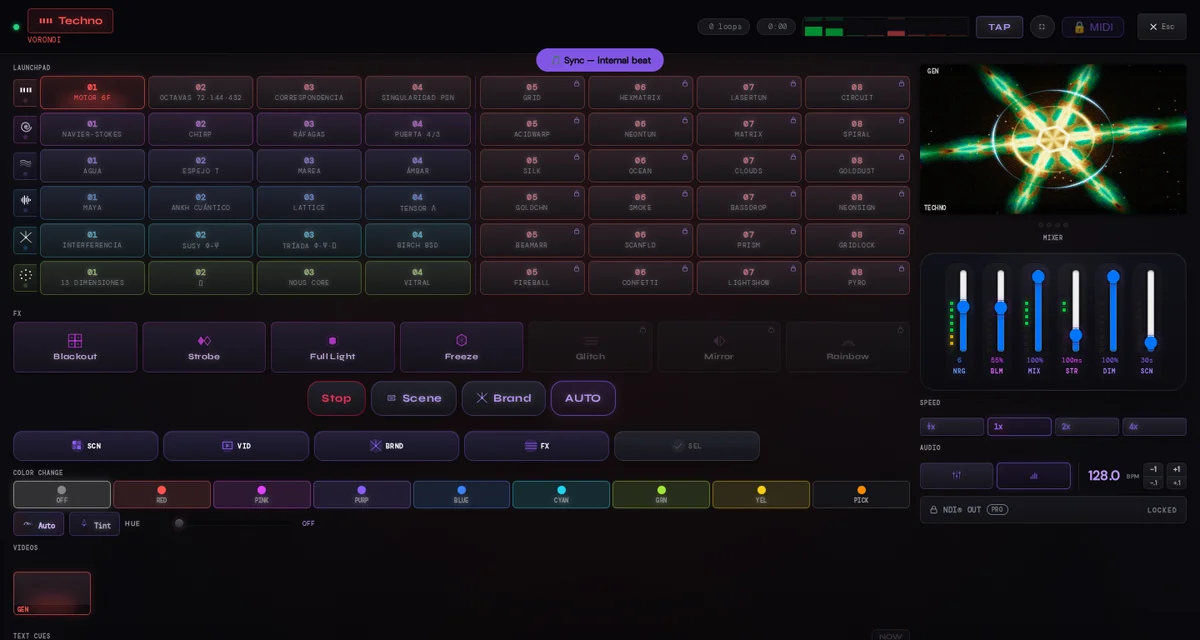
A browser cannot publish a native NDI sender by itself. You must install and open LumaDeck Output Bridge on the same computer as desktop Chrome. On Windows/macOS install the official NDI Tools/Runtime; on Linux install libndi from the official NDI SDK. The receiving application also needs an NDI-capable input.
Download the local bridge
The bridge includes its own execution runtime, so it does not depend on a separate Node.js installation. It deliberately does not hide or repackage NDI Tools: the official NDI Runtime remains a separate prerequisite.
- Windows 10/11 · x64 installer · 0.1.2
- Linux · x64 installer · 0.1.0
- macOS · Apple Silicon package · 0.1.0
- macOS · Intel package · 0.1.0
Linux: after downloading, run chmod +x LumaDeck-Output-Bridge-0.1.0-linux-x64.run and then ./LumaDeck-Output-Bridge-0.1.0-linux-x64.run.
Signing status: Windows 10/11 version 0.1.2 is Authenticode-signed by Jaime Constán Nava (CJ Development) and timestamped by Certum. The macOS packages remain unsigned previews and may therefore trigger Gatekeeper.
The complete signal path
- Install the official NDI runtime for the computer: Tools/Runtime on Windows/macOS, or
libndifrom the SDK on Linux. - Install and open LumaDeck Output Bridge. It binds only to 127.0.0.1:5960, not to a public or LAN control address.
- Open LumaDeck in desktop Chrome and sign in with an active Web Pro account.
- In the Master, press NDI OUT. Choose the source name, resolution and frame rate, then start the output.
- In OBS, vMix, Resolume or another compatible receiver, add an NDI input and select the source name you chose.
OBS normally needs an NDI-compatible input plugin; other applications may expose NDI differently. LumaDeck publishes one standard source rather than maintaining a separate proprietary connector for every receiver. If the receiving software supports the same NDI generation and discovers the source on the network, it can use that source. Test the exact receiver version and network before a show.
Resolution, frame rate and sound
The current Web control publishes video only at 960 × 540, 1280 × 720 or 1920 × 1080, with 25 or 30 fps options. Full HD at 30 fps still moves and converts substantially more pixel data than 720p. Start at 720p/30 on unfamiliar hardware, verify the full chain, then raise the resolution.
Audio is not embedded in this first NDI OUT release. Route the booth or program audio directly into the receiving application and synchronize it there.
Compatibility and setup notes
The bridge route has completed end-to-end reception with OBS on Linux KDE and Windows 10. Linux has received the LumaDeck source at 1280 × 720/30 and 1920 × 1080/30; Stop→Start and opening OBS after NDI OUT was already live both recovered the source.
Windows needs the official NDI Runtime and OBS needs an NDI input plugin: without either piece, there is no source to publish or receiver entry to select. Other receivers expose NDI through their own version and configuration, so use the same setup checklist before a show. The macOS packages remain unsigned previews.
What stays local
The browser hands frames to the bridge through the IPv4 loopback interface. LumaDeck does not upload those frames to its servers. The bridge then publishes the NDI video source on your local network, where your chosen receiver can discover it. Authorization is checked against Web Pro, but the video path itself remains local.
If the source does not appear
- Confirm that the bridge is open and its local health service is running.
- Confirm that the official NDI Runtime is installed; reinstall or restart the bridge after adding it.
- Use the same local network profile and allow the sender and receiver through the operating system firewall.
- Confirm that the receiver really has NDI input support enabled.
- Try 720p/30 first and use a short, unique source name.
Fullscreen and a second browser window remain useful no-install display routes. Capturing either window in OBS is still window capture. NDI OUT is the native NDI route, and that is precisely why it needs the local bridge.
Publish the visual master as NDI
Install the bridge and official runtime, then open the Master with your Web Pro account.
Open LumaDeck Web Pro