AUTO: visuals that run themselves while you DJ
You are here to play music, not to operate a screen. AUTO takes the show you prepared before doors and plays it through the set, reacting to the music, while any pad you touch still wins.
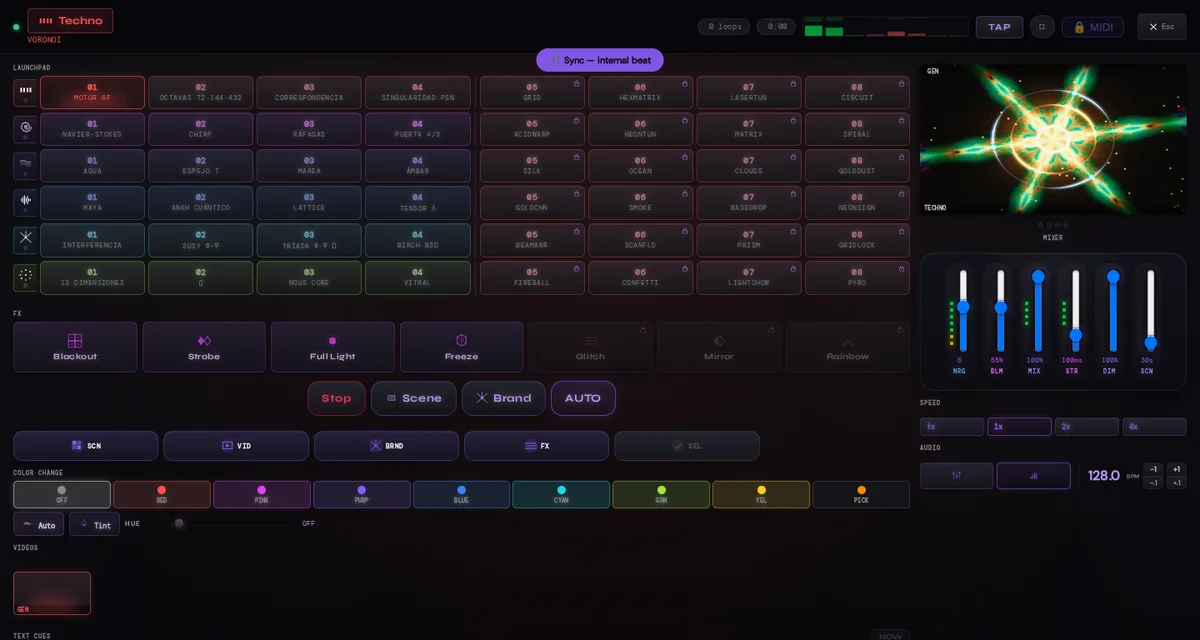
What AUTO actually does
AUTO is not an improviser. It plays the score you prepared. The score is the Master itself: every row you switch on is one mood (Techno, Rave, Ambient, Hip-Hop, Laser or Festival), and AUTO walks those rows in reading order, one full pass through every eligible pad before it repeats any of them. Your own videos enter in proportion to how many you loaded, and FX land on the conductor's bar grid; your DJ or event text follows its own timers. All of it keeps reacting to the audio you chose: the movement lives inside each scene, independent of how often AUTO changes it.
Before doors: three decisions
Which rows play. Each row of the Master has its own toggle; a row that is off never enters the rotation. Free gives you all six moods and 48 scenes to choose from. If you want to go finer than a row, the SEL chip switches the pads into eligibility mode so you can leave individual pads out.
How long each scene stays. The Auto-scene / SCN slider in Scenes, also mirrored in the controller, runs from 0.33 to 600 seconds in 0.01 s steps; it starts at 30 s. Choose the cadence: try longer intervals for a quiet atmosphere or shorter changes for an intense set. The conductor checks the interval on each beat and changes on the next available beat once that time has elapsed. Choosing 0.33 s does not automatically detect or synchronize to 180 BPM.
The transition fits the scene. Cut, Morph and Flash respect your choice. Morph accepts a preference of up to 6 s, but its effective duration follows the scene interval: up to a 1 s scene, at most 240 ms; with longer intervals it gradually expands while leaving stable time. Your preference is retained for when you lengthen the scenes again. For a venue setup, try 10 s per scene and a 1 s Morph as a starting point.
Which families are allowed. The chips under AUTO in the extended controller switch whole domains on or off: SCN for scenes and pads, VID for your loaded clips, BRND for your name and event, FX for the three Web Pro effects (Glitch, Mirror, Rainbow) — in Free this chip has nothing to fire. With VID on, an image in NORMAL mode stays for 8 beats, a clip of up to 8 seconds plays twice at most and a longer clip plays once, then the show returns to scenes. An image in LAYER mode uses its own duration and interval. Your text follows its own Show every and Visible for sliders in the Text panel.
During the set: you still hold the wheel
Tap any pad and it fires immediately. AUTO then rests that family for twelve bars at the tempo the instrument is following (SYNC, TAP or the default) and picks up where it was, without skipping ahead. The AUTO button, or the P key, switches the conductor on and off at any moment; Scene and Brand stay available for one-off cues. The DJ prepares, AUTO plays, and the DJ can always interrupt.
Two automations, one show
The scene section also has an Auto-scene preview for setup, useful while you decide times and mixes. It is not the live program. When the Master's AUTO is on, that preview stays parked automatically, so one program drives the screen at a time. Both read the same Auto-scene slider. If the show ever seems to jump between only four scenes, check which of the two you switched on.
What AUTO will not do
It will not invent a cadence you did not set, play a row you switched off or take a video out of your hands beyond the limits above. Image, video and GLSL files remain local; when you save a Pro show, its configuration and text are stored in your account. And it does not need Web Pro. Pro widens the pool it can draw from, with 48 pads and up to 21 videos and shaders, and adds the live FX and MIDI, but the conductor itself is part of Free.
Bar or lounge, three hours: Ambient plus one more row, Auto-scene between three and five minutes, VID on with one media item in Free or two or three of your clips in Pro, name and event every minute. Club, peak hour: Techno and Rave rows, Auto-scene at 30 to 45 seconds, FX on if you run Web Pro, and your hands on the pads for the drops. Give the engine a real audio input first: the SYNC, Mic or Line guide covers it, and from laptop to the big screen gets the output to the projector.
The LumaDeck setup guide covers choosing scenes, placing your logo and preparing tonight’s text. It includes instructions to copy to your assistant, controls and Free/Pro limits. Try the setup with Free; saving and restoring shows requires Pro. Your files stay on your device.
Prepare the rules, then press AUTO
Open LumaDeck, switch on the rows you want tonight, set the Auto-scene time and let the conductor take the set.
Open LumaDeck